
Customers Mail CloudのWebhookは2種類あります。
- メール受信時
- メール送信時
メール送信時は、送信したメールに対してステータスが変わったタイミングで通知が送られるものです。
その際、 application/json を指定しない設定ができます。この時のデータがどうなっているのか紹介します。
<!—more—>
AWS Lambdaの準備
AWS Lambdaで新しい関数を作成します。その際、条件として以下を指定します。
- ランタイム
.NET 8 (C#/F#/PowerShell) - 関数 URL を有効化
チェックを入れる - 認証タイプ
NONE
関数の作成が完了したら、関数コードを作成します。これは、ローカルで実行します。
dotnet tool install -g Amazon.Lambda.Tools
dotnet new lambda.EmptyFunction --name ExampleCS
このコマンドを実行すると、以下のような構成でプロジェクトが作成されます。
.
├── src
│   └── ExampleCS
│       ├── aws-lambda-tools-defaults.json
│       ├── ExampleCS.csproj
│       ├── Function.cs
│       └── Readme.md
└── test
    └── ExampleCS.Tests
        ├── ExampleCS.Tests.csproj
        └── FunctionTest.cs

4 directories, 6 files
この中の、 Function.cs に処理を記述します。ベースになるコードは以下の通りです。実際に処理を行うのは FunctionHandler メソッドです。
using Amazon.Lambda.Core;

// Assembly attribute to enable the Lambda function's JSON input to be converted into a .NET class.
[assembly: LambdaSerializer(typeof(Amazon.Lambda.Serialization.SystemTextJson.DefaultLambdaJsonSerializer))]

namespace ExampleCS;

public class Function
{

    /// <summary>
    /// A simple function that takes a string and does a ToUpper
    /// </summary>
    /// <param name="input">The event for the Lambda function handler to process.</param>
    /// <param name="context">The ILambdaContext that provides methods for logging and describing the Lambda environment.</param>
    /// <returns></returns>
    public string FunctionHandler(string input, ILambdaContext context)
    {
        return input.ToUpper();
    }
}
また、Lambdaの管理画面にて、ハンドラーの設定を ExampleCS::ExampleCS.Function::FunctionHandler に変更します。
受け取るWebhookの設定
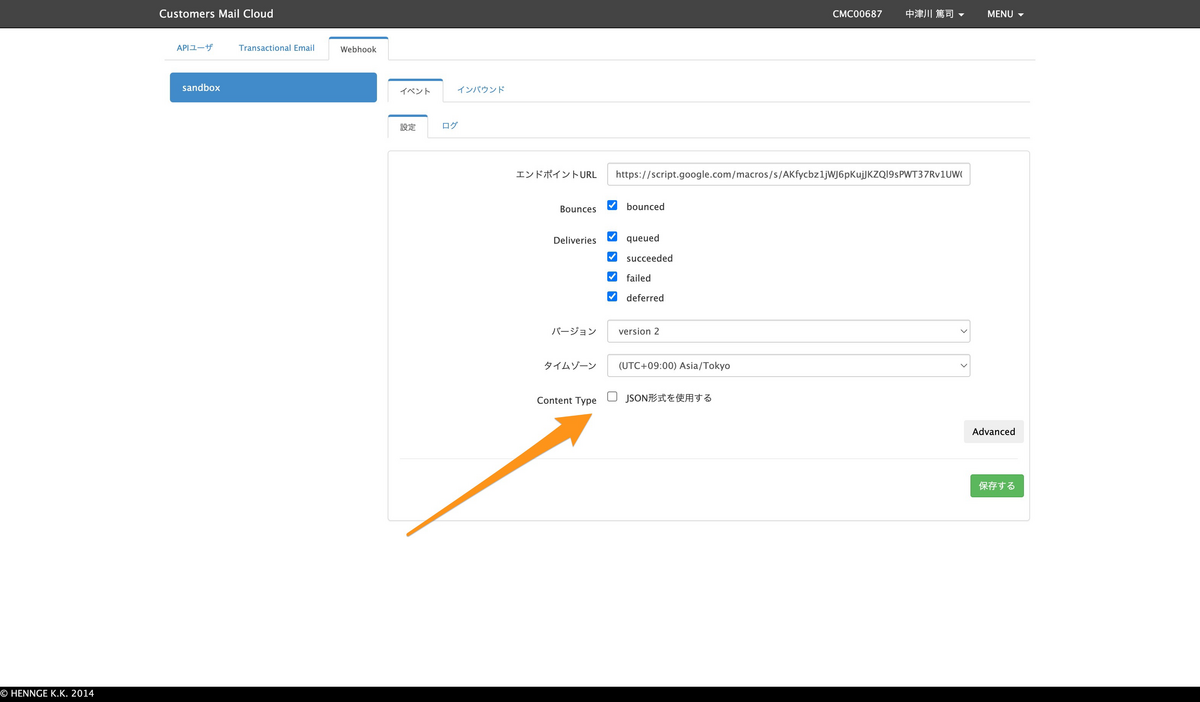
管理画面にて、受け取るWebhookを設定できます。設定は以下が用意されています。
- Bounces
- bounced(エラーメールを受け取る)
- Deliveries
- queued(キューに入ったタイミング)
- succeeded(送信完了)
- failed(送信失敗)
- deferred(送信延期)
この中で application/json を指定できます。指定しなかった場合、データは application/x-www-form-urlencoded にて送信されます。本記事ではこの場合を想定しています。
送信されてくるデータについて
メール送信した直後
メール送信を行うと、そのデータがキューに入ります。そして、以下のようなWebhookが送られてきます(データは一部マスキングしています)。データは分かりやすいようにJSONにしていますが、実際には異なりますので注意してください。
{
    "event_type": "deliveries",
    "server_composition": "pro",
    "event": '{"deliveries":[{"reason":"","sourceIp":"100.100.100.1","returnPath":"info@return.pro.smtps.jp","created":"2023-01-25 14:03:06","subject":"メールマガジンのテスト","apiData":"","messageId":"<031a32d4-06cd-b1ae-9526-011c0b9f1296@example.com>","from":"info@example.com","to":"user@example.jp","senderIp":"","status":"queued"}]}'
}
メール送信完了時
Customers Mail Cloudからメール送信処理が行われると、ステータスが succeeded になったWebhookが送られてきます。
{
    "event_type": "deliveries",
    "server_composition": "pro",
    "event": '{"deliveries":[{"reason":"","sourceIp":"","returnPath":"info@return.pro.smtps.jp","created":"2023-01-25 14:03:09","subject":"メールマガジンのテスト","apiData":"","messageId":"<031a32d4-06cd-b1ae-9526-011c0b9f1296@example.com>","from":"info@example.com","to":"user@example.jp","senderIp":"100.100.100.3","status":"succeeded"}]}'
}
メール送信失敗時(メールアドレス形式に問題がある場合)
メールアドレスの形式に問題があるなど、送信処理が失敗した場合には以下のようなWebhookが送られてきます。
{
    "event_type": "bounces",
    "server_composition": "pro",
    "event": '{"bounces":[{"reason":"host unknown","returnPath":"info@return.pro.smtps.jp","created":"2023-01-25 14:05:15","subject":"メールマガジンのテスト","apiData":"","messageId":"<8f902ee7-ae65-8711-48a8-2f708cb14205@example.com>","from":"info@example.com","to":"user@example","status":"1"}]}'
}
メール送信失敗時(送信先サーバーからエラーが返ってくる場合)
ユーザーが存在しない、メールボックスがいっぱいなど送信先サーバーからエラーが返ってきた場合には、以下のようなJSONが返ってきます。
{
    "event_type": "deliveries",
    "server_composition": "pro",
    "event": '{"deliveries":[{"reason":"550 5.1.1 The email account that you tried to reach does not exist. Please try 5.1.1 double-checking the recipient's email address for typos or 5.1.1 unnecessary spaces. Learn more at 5.1.1  <https://support.google.com/mail/?p=NoSuchUser> b197-20020a621bce000000b0058b80756b07si311029pfb.3 - gsmtp (in reply to RCPT TO)","sourceIp":"","returnPath":"info@return.pro.smtps.jp","created":"2023-01-25 14:06:06","subject":"メールマガジンのテスト","apiData":"","messageId":"<9e7e564c-ac83-8cd8-2cb4-b9ff2a9f168d@example.com>","from":"info@example.com","to":"no-user@example.jp","senderIp":"100.100.100.3","status":"failed"}]}'
}
エラーとしてのWebhookも送られてきます。上記のものと event_type が異なるので注意してください。
{
    "event_type": "bounces",
    "server_composition": "pro",
    "event": '{"bounces":[{"reason":"550 5.1.1 The email account that you tried to reach does not exist. Please try 5.1.1 double-checking the recipient's email address for typos or 5.1.1 unnecessary spaces. Learn more at 5.1.1  <https://support.google.com/mail/?p=NoSuchUser> b197-20020a621bce000000b0058b80756b07si311029pfb.3 - gsmtp (in reply to RCPT TO)","returnPath":"info@return.pro.smtps.jp","created":"2023-01-25 14:06:07","subject":"メールマガジンのテスト","apiData":"","messageId":"<9e7e564c-ac83-8cd8-2cb4-b9ff2a9f168d@example.com>","from":"info@example.com","to":"no-user@example.jp","status":"2"}]}'
}
C#のコード
処理は ExampleCS/src/ExampleCS/Function.cs に記述します。
using Amazon.Lambda.Core;

[assembly: LambdaSerializer(typeof(Amazon.Lambda.Serialization.SystemTextJson.DefaultLambdaJsonSerializer))]

namespace ExampleCS;

public class Function
{

    /// <summary>
    /// A simple function that takes a string and does a ToUpper
    /// </summary>
    /// <param name="input">The event for the Lambda function handler to process.</param>
    /// <param name="context">The ILambdaContext that provides methods for logging and describing the Lambda environment.</param>
    /// <returns></returns>
    public string FunctionHandler(string input, ILambdaContext context)
    {
        return "ok";
    }
}
また、データの入力を格納するクラス MailWebhookFormData を用意します。クラスのプロパティはCustomers Mail Cloudのドキュメントを参考にしています。
using Amazon.Lambda.Core;
using Amazon.Lambda.APIGatewayEvents;
using System.Text.Json;
using System.Text.Json.Serialization;

// Lambda関数のJSON入力を.NETクラスに変換するためのアセンブリ属性
[assembly: LambdaSerializer(typeof(Amazon.Lambda.Serialization.SystemTextJson.DefaultLambdaJsonSerializer))]

namespace ExampleCS;

/// <summary>
/// Webhookから受信するメールイベントのルートオブジェクト(Form-URLEncoded形式)
/// event_typeとserver_compositionは文字列、eventフィールドはJSON文字列として受信されます
/// </summary>
public class MailWebhookFormData
{
    /// <summary>
    /// イベントタイプ("deliveries" または "bounces")
    /// </summary>
    [JsonPropertyName("event_type")]
    public string EventType { get; set; } = string.Empty;

    /// <summary>
    /// サーバー構成(例:"pro")
    /// </summary>
    [JsonPropertyName("server_composition")]
    public string ServerComposition { get; set; } = string.Empty;

    /// <summary>
    /// イベントデータのJSON文字列
    /// この文字列を更にパースしてEventDataオブジェクトに変換する必要があります
    /// </summary>
    [JsonPropertyName("event")]
    public string EventJson { get; set; } = string.Empty;
}

/// <summary>
/// イベントデータのコンテナ
/// deliveriesまたはbouncesのいずれかを含みます
/// </summary>
public class EventData
{
    /// <summary>
    /// 配信イベントのリスト(event_type が "deliveries" の場合)
    /// </summary>
    [JsonPropertyName("deliveries")]
    public List<MessageEvent>? Deliveries { get; set; }

    /// <summary>
    /// バウンスイベントのリスト(event_type が "bounces" の場合)
    /// </summary>
    [JsonPropertyName("bounces")]
    public List<MessageEvent>? Bounces { get; set; }
}

/// <summary>
/// メールイベントの詳細情報
/// 配信イベントとバウンスイベントの両方に対応した統合クラス
/// </summary>
public class MessageEvent
{
    /// <summary>
    /// イベントの理由やステータス詳細
    /// 配信の場合:配信理由、バウンスの場合:バウンス理由(例:"host unknown")
    /// </summary>
    [JsonPropertyName("reason")]
    public string Reason { get; set; } = string.Empty;

    /// <summary>
    /// 送信元IPアドレス(配信イベントの場合のみ)
    /// </summary>
    [JsonPropertyName("sourceIp")]
    public string SourceIp { get; set; } = string.Empty;

    /// <summary>
    /// リターンパス(返信先メールアドレス)
    /// </summary>
    [JsonPropertyName("returnPath")]
    public string ReturnPath { get; set; } = string.Empty;

    /// <summary>
    /// イベント作成日時
    /// </summary>
    [JsonPropertyName("created")]
    public string Created { get; set; } = string.Empty;

    /// <summary>
    /// メールの件名
    /// </summary>
    [JsonPropertyName("subject")]
    public string Subject { get; set; } = string.Empty;

    /// <summary>
    /// API関連データ
    /// </summary>
    [JsonPropertyName("apiData")]
    public string ApiData { get; set; } = string.Empty;

    /// <summary>
    /// メッセージID(一意識別子)
    /// </summary>
    [JsonPropertyName("messageId")]
    public string MessageId { get; set; } = string.Empty;

    /// <summary>
    /// 送信者メールアドレス
    /// </summary>
    [JsonPropertyName("from")]
    public string From { get; set; } = string.Empty;

    /// <summary>
    /// 受信者メールアドレス
    /// </summary>
    [JsonPropertyName("to")]
    public string To { get; set; } = string.Empty;

    /// <summary>
    /// 送信者IPアドレス(配信イベントの場合のみ)
    /// </summary>
    [JsonPropertyName("senderIp")]
    public string SenderIp { get; set; } = string.Empty;

    /// <summary>
    /// ステータス
    /// 配信の場合:配信ステータス(例:"queued", "sent")
    /// バウンスの場合:バウンスステータスコード(例:"1")
    /// </summary>
    [JsonPropertyName("status")]
    public string Status { get; set; } = string.Empty;
}
全体の流れ
処理の流れは以下の通りです。まず、 APIGatewayProxyRequest を受け取り、リクエストボディをパースします。その後、 ParseFormUrlEncodedData メソッドにて、 MailWebhookFormData と EventData オブジェクトに変換します。
MailWebhookFormData webhookFormData;
EventData eventData;

(webhookFormData, eventData) = ParseFormUrlEncodedData(request.Body, request.IsBase64Encoded, context);
ParseFormUrlEncodedData メソッドは、リクエストボディをデコードし、URLエンコードされたフォームデータをパースして MailWebhookFormData と EventData オブジェクトに変換します。
event フィールドはJSON文字列として受信されるため、さらに EventData オブジェクトにデシリアライズします。
リクエストボディのパース
/// <summary>
/// Form-URLEncodedデータを解析してC#オブジェクトに変換します
/// eventフィールドのJSON文字列も同時にパースします
/// </summary>
/// <param name="body">リクエストボディ</param>
/// <param name="isBase64Encoded">ボディがBase64エンコードされているかどうか</param>
/// <param name="context">Lambda実行コンテキスト</param>
/// <returns>解析されたWebhookデータとイベントデータ</returns>
private static (MailWebhookFormData webhookData, EventData eventData) ParseFormUrlEncodedData(string body, bool isBase64Encoded, ILambdaContext context)
{
    try
    {
        // Form-URLEncodedデータをパース
        var formData = new MailWebhookFormData();
        var eventData = new EventData();

        context.Logger.LogInformation($"IsBase64Encoded: {isBase64Encoded}");
        context.Logger.LogInformation($"Original body: {body}");

        // Base64デコードが必要な場合
        string rawBody = body;
        if (isBase64Encoded)
        {
            try
            {
                var base64Bytes = Convert.FromBase64String(body);
                rawBody = System.Text.Encoding.UTF8.GetString(base64Bytes);
                context.Logger.LogInformation($"Base64 decoded body: {rawBody}");
            }
            catch (Exception ex)
            {
                context.Logger.LogError($"Failed to decode Base64: {ex.Message}");
                // Base64デコードに失敗した場合でも、元の文字列で試行を続ける
            }
        }

        // URLデコードして key=value ペアに分割
        var urlDecodedBody = Uri.UnescapeDataString(rawBody);
        context.Logger.LogInformation($"URL decoded body: {urlDecodedBody}");

        var keyValuePairs = urlDecodedBody.Split('&');

        foreach (var pair in keyValuePairs)
        {
            var keyValue = pair.Split('=', 2); // 最大2つに分割(値に=が含まれる可能性があるため)
            if (keyValue.Length == 2)
            {
                var key = Uri.UnescapeDataString(keyValue[0]);
                var value = Uri.UnescapeDataString(keyValue[1]);

                switch (key)
                {
                    case "event_type":
                        formData.EventType = value;
                        break;
                    case "server_composition":
                        formData.ServerComposition = value;
                        break;
                    case "event":
                        formData.EventJson = value;
                        // eventフィールドのJSON文字列をパース
                        context.Logger.LogInformation($"Parsing event JSON: {value}");
                        eventData = JsonSerializer.Deserialize<EventData>(value) ?? new EventData();
                        break;
                    default:
                        context.Logger.LogInformation($"Unknown field: {key} = {value}");
                        break;
                }
            }
        }

        return (formData, eventData);
    }
    catch (JsonException ex)
    {
        context.Logger.LogError($"JSON parsing error in event field: {ex.Message}");
        throw new Exception($"Failed to parse event JSON: {ex.Message}");
    }
}
ログ出力
今回は、最後にデバッグ用にログ出力を行います。 context.Logger を使用して、処理したイベントの情報を出力します。
context.Logger.LogInformation($"Processed event type: {webhookFormData.EventType}");
context.Logger.LogInformation($"Processed server composition: {webhookFormData.ServerComposition}");
if (eventData.Deliveries != null)
{
    context.Logger.LogInformation($"Number of deliveries: {eventData.Deliveries.Count}");
    context.Logger.LogInformation($"First delivery subject: {eventData.Deliveries.FirstOrDefault()?.Subject ?? "N/A"}");
}
if (eventData.Bounces != null)
{
    context.Logger.LogInformation($"Number of bounces: {eventData.Bounces.Count}");
    context.Logger.LogInformation($"First bounce subject: {eventData.Bounces.FirstOrDefault()?.Subject ?? "N/A"}");
}
出力例は以下の通りです。
2025-06-06T07:10:05.048Z  9c7c503d-633c-49b3-8f5f-d86e6371a6ca    info    Processed event type: bounces
2025-06-06T07:10:05.048Z    9c7c503d-633c-49b3-8f5f-d86e6371a6ca    info    Number of bounces: 1
2025-06-06T07:10:05.048Z    9c7c503d-633c-49b3-8f5f-d86e6371a6ca    info    First bounce subject: メールマガジンのテスト
全体のコード
全体のコードは以下の通りです。
using Amazon.Lambda.Core;
using Amazon.Lambda.APIGatewayEvents;
using System.Text.Json;
using System.Text.Json.Serialization;

// Lambda関数のJSON入力を.NETクラスに変換するためのアセンブリ属性
[assembly: LambdaSerializer(typeof(Amazon.Lambda.Serialization.SystemTextJson.DefaultLambdaJsonSerializer))]

namespace ExampleCS;

/// <summary>
/// Webhookから受信するメールイベントのルートオブジェクト(Form-URLEncoded形式)
/// event_typeとserver_compositionは文字列、eventフィールドはJSON文字列として受信されます
/// </summary>
public class MailWebhookFormData
{
    /// <summary>
    /// イベントタイプ("deliveries" または "bounces")
    /// </summary>
    [JsonPropertyName("event_type")]
    public string EventType { get; set; } = string.Empty;

    /// <summary>
    /// サーバー構成(例:"pro")
    /// </summary>
    [JsonPropertyName("server_composition")]
    public string ServerComposition { get; set; } = string.Empty;

    /// <summary>
    /// イベントデータのJSON文字列
    /// この文字列を更にパースしてEventDataオブジェクトに変換する必要があります
    /// </summary>
    [JsonPropertyName("event")]
    public string EventJson { get; set; } = string.Empty;
}

/// <summary>
/// イベントデータのコンテナ
/// deliveriesまたはbouncesのいずれかを含みます
/// </summary>
public class EventData
{
    /// <summary>
    /// 配信イベントのリスト(event_type が "deliveries" の場合)
    /// </summary>
    [JsonPropertyName("deliveries")]
    public List<MessageEvent>? Deliveries { get; set; }

    /// <summary>
    /// バウンスイベントのリスト(event_type が "bounces" の場合)
    /// </summary>
    [JsonPropertyName("bounces")]
    public List<MessageEvent>? Bounces { get; set; }
}

/// <summary>
/// メールイベントの詳細情報
/// 配信イベントとバウンスイベントの両方に対応した統合クラス
/// </summary>
public class MessageEvent
{
    /// <summary>
    /// イベントの理由やステータス詳細
    /// 配信の場合:配信理由、バウンスの場合:バウンス理由(例:"host unknown")
    /// </summary>
    [JsonPropertyName("reason")]
    public string Reason { get; set; } = string.Empty;

    /// <summary>
    /// 送信元IPアドレス(配信イベントの場合のみ)
    /// </summary>
    [JsonPropertyName("sourceIp")]
    public string SourceIp { get; set; } = string.Empty;

    /// <summary>
    /// リターンパス(返信先メールアドレス)
    /// </summary>
    [JsonPropertyName("returnPath")]
    public string ReturnPath { get; set; } = string.Empty;

    /// <summary>
    /// イベント作成日時
    /// </summary>
    [JsonPropertyName("created")]
    public string Created { get; set; } = string.Empty;

    /// <summary>
    /// メールの件名
    /// </summary>
    [JsonPropertyName("subject")]
    public string Subject { get; set; } = string.Empty;

    /// <summary>
    /// API関連データ
    /// </summary>
    [JsonPropertyName("apiData")]
    public string ApiData { get; set; } = string.Empty;

    /// <summary>
    /// メッセージID(一意識別子)
    /// </summary>
    [JsonPropertyName("messageId")]
    public string MessageId { get; set; } = string.Empty;

    /// <summary>
    /// 送信者メールアドレス
    /// </summary>
    [JsonPropertyName("from")]
    public string From { get; set; } = string.Empty;

    /// <summary>
    /// 受信者メールアドレス
    /// </summary>
    [JsonPropertyName("to")]
    public string To { get; set; } = string.Empty;

    /// <summary>
    /// 送信者IPアドレス(配信イベントの場合のみ)
    /// </summary>
    [JsonPropertyName("senderIp")]
    public string SenderIp { get; set; } = string.Empty;

    /// <summary>
    /// ステータス
    /// 配信の場合:配信ステータス(例:"queued", "sent")
    /// バウンスの場合:バウンスステータスコード(例:"1")
    /// </summary>
    [JsonPropertyName("status")]
    public string Status { get; set; } = string.Empty;
}

/// <summary>
/// AWS Lambda関数のメインクラス
/// メールWebhookのForm-URLEncodedデータを処理します
/// </summary>
public class Function
{
    /// <summary>
    /// Lambda関数のエントリーポイント
    /// API Gatewayからのapplication/x-www-form-urlencodedリクエストを受け取り、メールイベントを処理します
    /// </summary>
    /// <param name="request">API Gatewayからのリクエスト情報</param>
    /// <param name="context">Lambda実行時の情報(ログ出力などに使用)</param>
    /// <returns>処理結果のJSON文字列</returns>
    public static string FunctionHandler(APIGatewayProxyRequest request, ILambdaContext context)
    {
        try
        {
            MailWebhookFormData webhookFormData;
            EventData eventData;

            (webhookFormData, eventData) = ParseFormUrlEncodedData(request.Body, request.IsBase64Encoded, context);

            context.Logger.LogInformation($"Processed event type: {webhookFormData.EventType}");
            context.Logger.LogInformation($"Processed server composition: {webhookFormData.ServerComposition}");
            if (eventData.Deliveries != null)
            {
                context.Logger.LogInformation($"Number of deliveries: {eventData.Deliveries.Count}");
                context.Logger.LogInformation($"First delivery subject: {eventData.Deliveries.FirstOrDefault()?.Subject ?? "N/A"}");
            }
            if (eventData.Bounces != null)
            {
                context.Logger.LogInformation($"Number of bounces: {eventData.Bounces.Count}");
                context.Logger.LogInformation($"First bounce subject: {eventData.Bounces.FirstOrDefault()?.Subject ?? "N/A"}");
            }
            return "ok";
        }
        catch (Exception ex)
        {
            context.Logger.LogError($"Error processing webhook data: {ex.Message}");
            return JsonSerializer.Serialize(new { error = "Internal server error", details = ex.Message });
        }
    }

    /// <summary>
    /// Form-URLEncodedデータを解析してC#オブジェクトに変換します
    /// eventフィールドのJSON文字列も同時にパースします
    /// </summary>
    /// <param name="body">リクエストボディ</param>
    /// <param name="isBase64Encoded">ボディがBase64エンコードされているかどうか</param>
    /// <param name="context">Lambda実行コンテキスト</param>
    /// <returns>解析されたWebhookデータとイベントデータ</returns>
    private static (MailWebhookFormData webhookData, EventData eventData) ParseFormUrlEncodedData(string body, bool isBase64Encoded, ILambdaContext context)
    {
        try
        {
            // Form-URLEncodedデータをパース
            var formData = new MailWebhookFormData();
            var eventData = new EventData();

            context.Logger.LogInformation($"IsBase64Encoded: {isBase64Encoded}");
            context.Logger.LogInformation($"Original body: {body}");

            // Base64デコードが必要な場合
            string rawBody = body;
            if (isBase64Encoded)
            {
                try
                {
                    var base64Bytes = Convert.FromBase64String(body);
                    rawBody = System.Text.Encoding.UTF8.GetString(base64Bytes);
                    context.Logger.LogInformation($"Base64 decoded body: {rawBody}");
                }
                catch (Exception ex)
                {
                    context.Logger.LogError($"Failed to decode Base64: {ex.Message}");
                    // Base64デコードに失敗した場合でも、元の文字列で試行を続ける
                }
            }

            // URLデコードして key=value ペアに分割
            var urlDecodedBody = Uri.UnescapeDataString(rawBody);
            context.Logger.LogInformation($"URL decoded body: {urlDecodedBody}");

            var keyValuePairs = urlDecodedBody.Split('&');

            foreach (var pair in keyValuePairs)
            {
                var keyValue = pair.Split('=', 2); // 最大2つに分割(値に=が含まれる可能性があるため)
                if (keyValue.Length == 2)
                {
                    var key = Uri.UnescapeDataString(keyValue[0]);
                    var value = Uri.UnescapeDataString(keyValue[1]);

                    switch (key)
                    {
                        case "event_type":
                            formData.EventType = value;
                            break;
                        case "server_composition":
                            formData.ServerComposition = value;
                            break;
                        case "event":
                            formData.EventJson = value;
                            // eventフィールドのJSON文字列をパース
                            context.Logger.LogInformation($"Parsing event JSON: {value}");
                            eventData = JsonSerializer.Deserialize<EventData>(value) ?? new EventData();
                            break;
                        default:
                            context.Logger.LogInformation($"Unknown field: {key} = {value}");
                            break;
                    }
                }
            }

            return (formData, eventData);
        }
        catch (JsonException ex)
        {
            context.Logger.LogError($"JSON parsing error in event field: {ex.Message}");
            throw new Exception($"Failed to parse event JSON: {ex.Message}");
        }
    }
}
まとめ
Webhookを使うことで、メール送信ステータスの変化に応じて通知を受け取れるようになります。メールと連携したシステムを開発する際に役立つでしょう。
AWS Lambdaの場合は application/json を指定した方が全体として、受け取りやすい印象です。ぜひお試しください。なお、このWebhookはSMTP経由の場合、利用できます。
